Draw a diagram
Write a few lines of text, see a diagram. Install the Studio extension and open a recognised file in VS Code — the preview refreshes on save.
Install Studio →You leave with a decision you can keep true. Not a report of one — the model the decision was made in, in your own repository, and the method to keep it current after we are gone.
Architecture-as-Code for the enterprise — the git-native, text-first discipline software already has, carried up to the strategy, business and architecture layers that code-scoped tools never reach.
Write a few lines of text, see a diagram. Install the Studio extension and open a recognised file in VS Code — the preview refreshes on save.
Install Studio →Adopt Transitrix for your organisation. One prompt to a coding agent scaffolds a structured repository and CI validates every change.
Methodology quick start →Architecture-as-Code for the enterprise — the git-native, text-first discipline software already has, carried up to the strategy, business and architecture layers that code-scoped tools never reach.
Against code-scoped tools. Architecture-as-Code exists today and stops at software. The layers where the money is committed — motivation, strategy, business — are the ones it never reaches, and they are the ones this covers.
Against context and memory layers. This is a formal model, not free-form notes and not opaque embeddings. It validates, it diffs, and a change to it is reviewed the way a change to code is reviewed. A machine can act on it because it is grounded, not because it was remembered.
Two units are open today. Two more extend the same thesis.
The foundation. A text-native way to model an organisation — goals, processes, capabilities, and structure — as code. Says how to describe an enterprise so it remains readable, versionable, and executable.
View on GitHub →The unified editor extension and CLI to author and preview Transitrix formats — the reference implementation of the methodology. Preview strategy, processes, capabilities and catalogues, with the host differences described below.
Explore Studio features → Install →Dynamic strategy management that operates on the Transitrix model, updating as the enterprise model changes — not yet publicly available.
More on Transitrix DSM →A research platform for modelling what agents do inside a Transitrix-described enterprise. The behaviour layer of the stack. In narrative; not in active development in the next six months.
Neither is open. See what they do and how to see them working →
Updated for Studio 3.8.0 in VS Code-compatible editors, the separately installed CLI 2.10.0, and Methodology 7.0.0. JetBrains support is described separately below; check its marketplace listing for the available plugin version.
Choose your host: the VS Code extension (also installable in compatible Cursor, VSCodium and Windsurf editors) opens recognised previews automatically and refreshes them on save; autosave can shorten the edit–preview loop. Preview settings.
The JetBrains plugin requires a compatible IDE with JCEF (platform builds 242–262). Open Transitrix: Preview Notation from the editor's context menu. Its read-only preview is a snapshot: close and reopen it after editing. It supports strategy, process-map/blueprint and supported catalogue previews, but does not include BPMN, the VS Code requirements/compliance reports or SVG/PNG export commands. Capability history requires the VS Code or repository-validation context; JetBrains cannot resolve it for a standalone preview. JetBrains installation.
The editor plugins bundle their renderers; the CLI is a separate installation, not a command added to your shell by installing an editor plugin. No DSM installation is required for the capabilities listed here. Install the CLI.
A few lines of text become a diagram you can read, review, and version. You author a Transitrix file in VS Code; the preview refreshes alongside it on save. Autosave can shorten the loop.
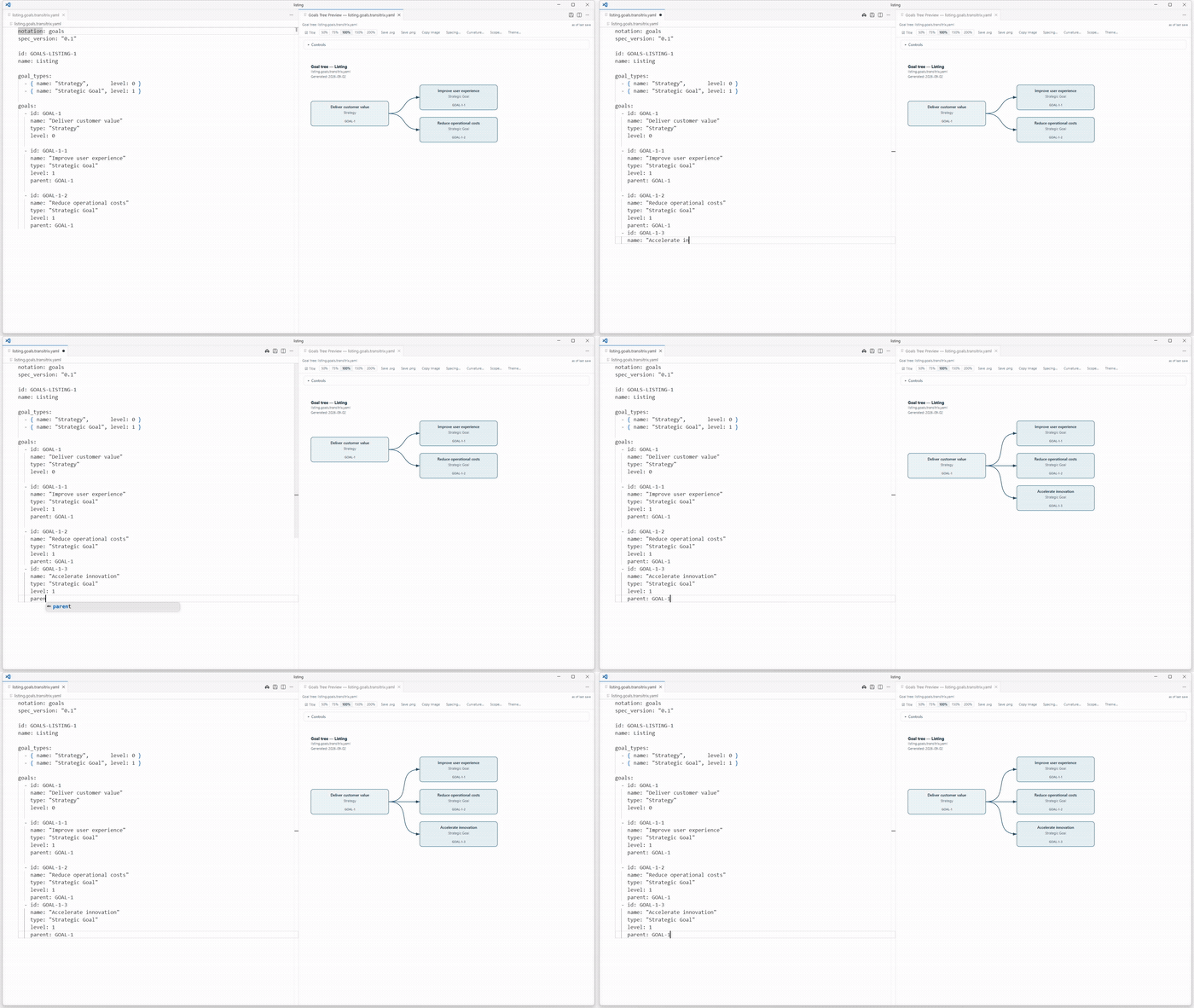
You describe your enterprise once, as text. Two editor extensions render that single model across every layer — so the same source serves the boardroom and the codebase.
Built on open standards — ArchiMate 3.2 and BPMN 2.0 — with everything as plain, diffable text. Nothing is locked in: the technical views are standard PlantUML and Mermaid, and your files stay readable with or without our tooling.
Both the methodology and Transitrix Studio are public. The methodology specification lives at github.com/transitrix/methodology. Transitrix Studio’s editor plugins install into VS Code, compatible Cursor, VSCodium and Windsurf editors, and compatible JetBrains IDEs; the CLI installs separately. See the install options. Source at github.com/transitrix/transitrix-studio. For the exact shape of every notation, see the DSL examples reference; recipes — prose with directives, named *.<kind>.ttrs — are described on the .ttrs recipe format page.
If you are evaluating Transitrix for a pilot or want to follow the work, reach out at hello@transitrix.com.
Cheat sheets, templates and worked examples — read on the page, take the PDF away. No sign-up, no email, no gate. Browse the library →
One subject per page, in more depth than this front page goes. Read the explainers →
Eight steps from "What is this?" to your first diagram. About 20–30 minutes. Start the learning path →